TPM Auto-Unlock With Dual Boot: Making LUKS Stop Asking For My Password
When I first set up TPM auto-unlock, my LUKS-encrypted disk seemed to forget I existed after every reboot. Windows gaming session? Password. Plugged in the eGPU? Password. Kernel update? Password. I’d re-enroll the TPM, it would work for a day or two, then break again.
This is the same Framework 13 + RTX 3070 eGPU that already needed its own pile of workarounds just to show a picture on a monitor. Of course it also breaks TPM measurements.
The password is 20 characters. Typing it takes about four seconds. I could have just kept typing it. Instead I spent a weekend setting up Secure Boot with custom keys, writing a systemd service, and packaging the whole thing for AUR. Because of course I did.
How TPM + LUKS works (briefly)#
The TPM chip has a set of registers called PCRs (Platform Configuration Registers). Each one measures a different aspect of the system state: firmware, bootloader, Secure Boot policy, and so on. When you run systemd-cryptenroll --tpm2-device=auto --tpm2-pcrs=7, you’re telling the TPM to seal the LUKS key against the current values of those registers. Next boot, if the values match, the TPM releases the key and the disk unlocks. If anything changed, the TPM refuses and you type your password.
The idea is that if someone tampers with your boot chain, the PCR values shift and the key stays locked. Good concept. The problem is that plenty of non-malicious things also shift PCR values.
PCR register reference#
Here’s the full table. I wish I had this when I started.
| PCR Codes | Measures | Changes when | Notes (spoilers) |
|---|---|---|---|
| 0 | Firmware code (UEFI) | Firmware update | Tried it, too narrow on its own |
| 1 | Firmware config | BIOS settings, hardware changes | Tried it, eGPU broke it instantly |
| 2 | Option ROM code | Add/remove GPU with option ROM | Rarely useful |
| 3 | Option ROM config | Option ROM settings change | Rarely useful |
| 4 | Boot loader code | Kernel or bootloader update | Tried it, lasted about three days on Arch |
| 5 | Boot loader config | GPT/EFI variable changes | Tried it, broke when I resized a partition |
| 7 | Secure Boot policy | SB on/off, key db/dbx changes | What I ended up using |
| 8-10 | OS-defined | Varies by distro | Distro-specific |
| 11 | Unified Kernel Image | UKI update | Skipped this, see below |
| 14 | MOK (shim) | MOK key changes | Shim-based setups |
PCR 4 and 5 are the worst offenders on Arch because kernel updates happen constantly. PCR 0 is stable but only covers firmware, so it doesn’t verify much on its own.
My first attempt (wrong PCRs)#
I started with --tpm2-pcrs=0+1+4+5 because a forum post said it was a good combination. It worked for exactly two boots. Then I plugged in the eGPU, which changed PCR 1 (hardware configuration), and I was back to typing my password. This is the same eGPU that needed its own pile of workarounds just to allocate PCI BARs. Naturally it also breaks TPM measurements.
OK, so PCR 1 is out because of the eGPU. PCR 4 broke on the next kernel update, which on Arch is about every three days. PCR 5 broke when I resized a partition. They all worked, kind of. Just not for more than a few days at a time.
Attempt two: PCR 7 with Secure Boot#
PCR 7 seemed like the answer. It measures Secure Boot policy, which doesn’t change unless you modify your Secure Boot keys or turn it off. Much more stable than measuring the actual bootloader binary.
But Arch doesn’t ship signed bootloaders (not for rEFInd anyway), so I had to set up Secure Boot with custom keys. This was its own afternoon.
Setting up Secure Boot on Arch with sbctl#
The tool for this is sbctl. It manages your own set of Secure Boot keys and signs whatever you tell it to.
sudo pacman -S sbctl
sudo sbctl create-keys
Before you can enroll your keys, the firmware needs to be in Setup Mode. This means going into the UEFI settings and clearing the existing Secure Boot keys (look for something like “Reset to Setup Mode” or “Clear Secure Boot keys” under Security). You do this once, boot back into Linux, then enroll:
sudo sbctl enroll-keys --microsoft
The --microsoft flag is important if you dual-boot. It includes Microsoft’s signing certificates alongside yours, so Windows can still boot. Without it, you get a machine that only boots Linux, which sounds fun until you remember you need Windows for gaming.
Then sign everything that needs to be verified at boot:
sudo sbctl sign -s /boot/EFI/refind/refind_x64.efi
sudo sbctl sign -s /boot/vmlinuz-linux-lts
sudo sbctl sign -s /boot/vmlinuz-linux-xanmod-linux-bin-x64v3
The -s flag saves each path to sbctl’s database. This matters because sbctl ships a pacman hook (zz-sbctl.hook) that automatically re-signs all registered files when packages update them. So when Arch pushes a kernel update, the new vmlinuz gets signed without you doing anything.
After signing, reboot into UEFI again, enable Secure Boot, save and exit. If everything went right:
$ sbctl status
Installed:    ✓ sbctl is installed
Setup Mode:   ✓ Disabled
Secure Boot:  ✓ Enabled
If it didn’t boot, you probably forgot to sign something. Disable Secure Boot, boot normally, run sbctl verify to find the unsigned binary, sign it, try again. I went through this cycle twice because I kept forgetting that rEFInd also needs to be signed, not just the kernels.
With Secure Boot running, I enrolled the TPM against PCR 7:
sudo systemd-cryptenroll /dev/nvme0n1p5 --wipe-slot=tpm2 --tpm2-device=auto --tpm2-pcrs=7
And it worked. For about a week. Then I booted Windows for a gaming session, came back to Linux, and:
systemd-cryptsetup[423]: TPM2 token enrolled but not usable: TPM policy does not match current system state
Password prompt. Again.
So when does PCR 7 actually break?#
At first I assumed it broke on every OS switch. It doesn’t. I went Linux, Windows, Linux, and the TPM unlocked fine. Did it again. Still fine.
PCR registers reset to zero on every power cycle. They get measured fresh during each boot. So every Linux boot produces the same PCR 7 value (same Secure Boot keys, same chain), regardless of what you booted in between. The Windows boot produces a different PCR 7, sure, but that measurement dies when you shut down Windows. Next Linux boot starts from scratch.
PCR 7 only changes between Linux boots when the Secure Boot database itself is permanently modified:
- Windows Update modifies the dbx (revocation list). Microsoft is actively revoking the old “Windows Production PCA 2011” certificate via CVE-2023-24932. This has been a phased rollout since 2023, and from January 2026 it becomes automatic, no opt-out. When a Windows Update writes a new dbx to the UEFI firmware, that’s permanent. Next Linux boot sees a different dbx, PCR 7 changes.
fwupdmgr updateon Linux updates the dbx. Same effect, just from the Linux side.- UEFI firmware updates can include a new dbx.
- You re-enroll Secure Boot keys with
sbctl enroll-keys.
Normal dual-boot reboots? PCR 7 is fine. This happens maybe 1-2 times a year. Not great, not terrible.
Why not PCR 11 and UKI?#
There is a cleaner solution. UKI (Unified Kernel Images) bundle the kernel, initramfs, and command line into a single signed EFI binary. You bind to PCR 11 instead of PCR 7, and PCR 11 measures the UKI itself. No Secure Boot database involved, no dbx updates to worry about, no dual-boot conflict.
rEFInd can boot UKIs. So why didn’t I go this route?
UKI bakes the kernel command line into the binary. I run two kernels (xanmod and lts), each with six boot configurations (verbose, default, fallback, rescue, single, terminal). That’s twelve UKI images to build and sign on every kernel update, and I can’t edit boot parameters on the fly from the rEFInd menu anymore. If something breaks at boot, I want to be able to add single or drop quiet without rebuilding an image.
For a single-kernel setup, UKI + PCR 11 is probably the right answer. For my setup, I’d rather type a password once or twice a year.
What works for which setup#
After going through all of this I can save you some time.
Single-boot, no external hardware changes: --tpm2-pcrs=0+7 is solid. Firmware + Secure Boot policy. Stable, verifies a meaningful part of the boot chain.
Single-boot, with eGPU or frequent hardware changes: --tpm2-pcrs=7 alone. Keep PCR 1 far away from your enrollment command.
Single-boot, willing to restructure boot: UKI + --tpm2-pcrs=11. The cleanest option if you don’t need multiple boot configurations.
Dual-boot: --tpm2-pcrs=7 with automatic re-enrollment when dbx changes (what I built, keep reading). Or TPM + PIN if you want stronger protection.
If you want actual security against boot tampering: TPM + PIN with --tpm2-with-pin=yes. You type a short PIN every boot, and the TPM won’t unseal without it. This is what you’d want against an evil maid. But you type something every boot, which is what I was trying to avoid in the first place.
And orthogonal to all of this: you can add a FIDO2 key (YubiKey, Titan) as a separate LUKS slot. More on that later.
The solution: automatic re-enrollment#
Since this is rare, I didn’t want to store any key material on disk. My earlier approach used a TPM-sealed key file, but after thinking through the “store now, decrypt later” implications I scrapped it. Instead, the service just asks for your password a second time.
The trick is that when PCR 7 does change, you’ve already typed your password to unlock the disk (because TPM failed). The system is running. At that point, the service detects the mismatch and prompts you once more to re-enroll the TPM for next time.
Here’s the script:
#!/bin/bash
set -euo pipefail

# Auto-detect LUKS device from the running system.
# findmnt returns /dev/mapper/root on ext4, /dev/mapper/root[/subvol_root]
# on btrfs. cut -d'[' strips the subvol suffix (no-op on ext4).
: "${DEVICE:=$(cryptsetup status "$(findmnt -n -o SOURCE / | cut -d'[' -f1)" \
    2>/dev/null | awk '/device:/{print $2}')}"
: "${PCRS:=7}"

# If the TPM token can still unseal the key, nothing to do.
if cryptsetup open --test-passphrase --token-only "$DEVICE" 2>/dev/null; then
    exit 0
fi

# TPM policy mismatch: ask for password and re-enroll.
logger "tpm-reenroll: TPM policy mismatch detected, requesting password..."

systemd-ask-password "Enter LUKS password to re-enroll TPM:" | \
    systemd-cryptenroll "$DEVICE" \
        --unlock-key-file=/dev/stdin \
        --wipe-slot=tpm2 \
        --tpm2-device=auto \
        --tpm2-pcrs="$PCRS"

logger "tpm-reenroll: TPM re-enrollment complete (PCRs=$PCRS)"
Yes, the auto-detect has to handle btrfs subvolume paths, because I enjoy suffering in as many ways as possible.
cryptsetup open --test-passphrase --token-only tests whether the TPM token can unseal the key without actually opening the device. If it can, exit. If it can’t, ask for the password and re-enroll.
Security#
There’s no key material stored on disk. The password is provided interactively when needed and never written anywhere. The TPM seals the LUKS key against the current PCR values, so if someone pulls the NVMe and plugs it into another machine, or tampers with Secure Boot, the key stays locked.
A root attacker on the running system already has access to every mounted file, so the TPM doesn’t change that picture. The kernel keyring uses logon type keys for dm-crypt, which means even root can’t extract the volume master key from memory. But root can read all the files that the key protects, so it’s a moot point.
If you want protection against boot chain tampering (evil maid), consider TPM + PIN (--tpm2-with-pin=yes). You type a short PIN at every boot, and the TPM won’t unseal without it. For me, the whole point was not typing anything at boot, so I skipped the PIN.
FIDO2 as a complementary slot#
Separate from all the TPM stuff, systemd-cryptenroll also supports FIDO2 keys. You can add a YubiKey or Google Titan as another LUKS slot:
systemd-cryptenroll /dev/nvme0n1p5 --fido2-device=auto
This gives you a three-slot setup:
- Slot 0: password (emergency fallback, always works)
- Slot 1: TPM2 (automatic, managed by tpm-reenroll)
- Slot 2: FIDO2 (touch the key, always works regardless of PCR state)
The FIDO2 slot is nice because it doesn’t care about PCR values at all. If the TPM enrollment is broken and you don’t want to type your full passphrase, just tap the YubiKey. I haven’t integrated this into tpm-reenroll because it’s a separate thing entirely, but they complement each other well.
Installation#
The source is on GitHub with a PKGBUILD for Arch and packaging files for DEB/RPM:
# From AUR
paru -S tpm-reenroll

# Or from source
git clone https://github.com/thekoma/tpm-reenroll.git
cd tpm-reenroll
sudo make install
sudo systemctl enable tpm-reenroll.service
If you already have TPM enrolled, that’s it. If not, enroll first with systemd-cryptenroll --tpm2-device=auto --tpm2-pcrs=7 and create /etc/tpm-reenroll.conf with your device and PCR set. It’s a bash script and a systemd unit, not exactly a complex build system.
How it’s been going#
I’ve been running this for a while now. Normal Linux-Windows-Linux reboots work without a password prompt, which was a pleasant surprise after all the PCR debugging. The service has only kicked in once so far, after a Windows Update that touched the Secure Boot dbx. It asked for my password, re-enrolled, and the next boot was clean.
It also survived a few eGPU hot-plug cycles without issues, which I was mildly worried about since PCR 1 changes with hardware. But since I’m only binding to PCR 7, hardware changes don’t matter.
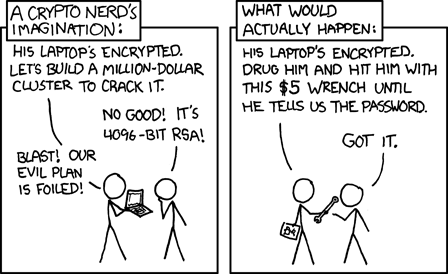
Of course, none of this matters if someone really wants your data. As xkcd correctly points out, the weakest part of any encryption setup is the person who knows the password. All the PCR registers and TPM sealing in the world won’t help you against a $5 wrench.
The code and systemd units are on GitHub. If you’re fighting similar TPM/LUKS annoyances or want to tell me my threat model is wrong, I’m on LinkedIn.