Ambilight on a Rooted LG C9 With a Discount-Store LED Strip and Home Assistant
In this post
I wanted the light behind my TV to follow the picture. Philips builds this into its TVs and calls it Ambilight. Mine is an LG OLED55C9 from 2019, so I had to build it.
The ingredients: a 5 meter LED strip from Action, the TV itself (rooted, so it can run its own capture software), and Home Assistant to decide who controls the strip. When the TV turns on, the strip follows the screen. When the TV is off and Music Assistant plays on the Sonos in the living room, the strip follows the music. Nothing goes through a cloud, Tuya’s included.
As I write this, the strip is still rolled up under the TV. All 25 segments show the average color of the screen, so for now my ambilight is a very well-engineered glowing coil. Mapping the LEDs to the edges of the screen comes after mounting.
The setup#
- TV: LG OLED55C9, webOS 4.10.2, software version 05.50.00, rooted
- Strip: LSC Smart Connect RGBIC+CCTIC, 5 m, revision 3203632.2, with a 24 V 1 A power supply
- Controller: the strip’s own board (
RGBMICIR_V1.0 2024.06.21) with a Beken BK7231N, now running ESPHome - Home Assistant on a Home Assistant Yellow, with EMQX (the MQTT broker) and Music Assistant 2.10.9 as add-ons
- Sonos in the living room, where Music Assistant plays
- LedFx, on a separate host
This is how the pieces talk to each other. The boxes are the two machines that matter, the Home Assistant Yellow and the TV. Amber is Home Assistant and its control traffic (dotted lines), blue is the TV, pink is the music side, and green is the light going to the strip (thick lines).
screen capture"] -->|frames| HY["HyperHDR
picture to colors"] end SO["Sonos"] LF["LedFx
music to colors"] ST["LED strip
ESPHome"] MA -->|audio| SO MA -->|Sendspin| LF HY ==>|E1.31| ST LF ==>|E1.31| ST HA <-.-> MQ MQ <-.->|MQTT| HY HA -.->|webOS, WoL| PC HA -.->|on / off| LF HA -.->|ESPHome API| ST classDef ha fill:#40361d,stroke:#eec35e,stroke-width:2px,color:#eceae5 classDef tv fill:#2d3128,stroke:#83a598,stroke-width:1.5px,color:#eceae5 classDef music fill:#3b2b28,stroke:#d3869b,stroke-width:1.5px,color:#eceae5 classDef strip fill:#343621,stroke:#a8c373,stroke-width:2.5px,color:#eceae5 class HA,MQ ha class PC,HY tv class MA,LF,SO music class ST strip style Y fill:#231e12,stroke:#eec35e,stroke-width:1.5px,color:#eec35e style TV fill:#1f1d16,stroke:#83a598,stroke-width:1.5px,color:#83a598 linkStyle 0,1,2 stroke:#b8b5ad,stroke-width:1.5px,color:#b8b5ad linkStyle 3,4 stroke:#a8c373,stroke-width:3.5px,color:#a8c373 linkStyle 5,6,7,8,9 stroke:#eec35e,stroke-width:1.5px,stroke-dasharray:5 4,color:#eec35e
HyperHDR and LedFx both send E1.31 (sACN, the DMX-over-UDP protocol from stage lighting) to universe 1 on the strip. The strip accepts whoever is sending, so Home Assistant has to make sure only one of them is.
Part 1: the strip#
What’s inside#
The LSC strip is a Tuya device. The firmware it came with (1.0.2) can’t be flashed over the air, so cloudcutter is out and the only way in is a serial adapter and a soldering iron. The BK7231N is soldered directly on the board, with no module you could swap for an ESP.
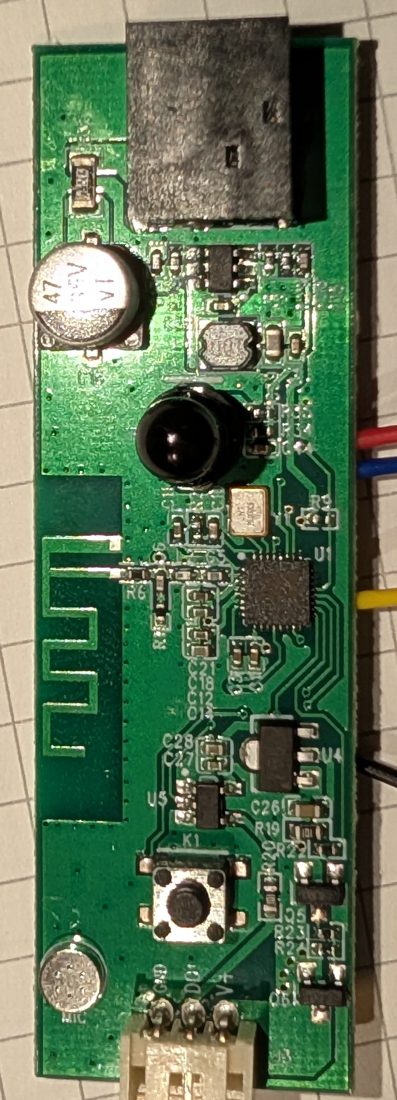
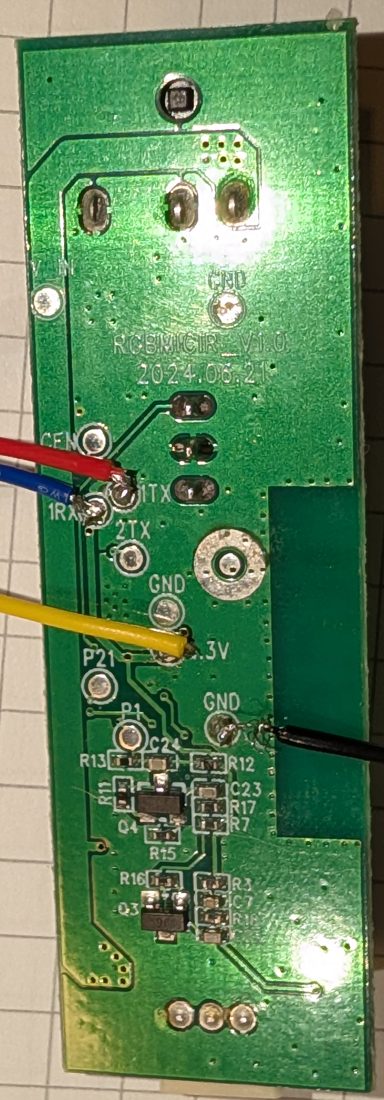
The strip has 50 addresses for 25 segments of 20 cm. Even addresses are the color chips, one per segment. Odd addresses are the white chips: channel 2 drives warm white, channel 3 cold white, and channel 1 is unused. The LED driver is an SM16703 (the chip is marked GZX16703) and the byte order is RBG, because of course it is.
The pins that matter on this board:
| Pin | Function |
|---|---|
| P22 | Switches the 24 V to the strip (high = on) |
| P16 | SM16703 data |
| P26 | IR receiver |
The afternoon I lost to the wrong board#
Most guides for this strip (twoenter.nl is the one everybody links) describe an older board, PCB_475P1-v1.0, that switches the 24 V with pin P8. I flashed OpenBeken 1.18.321 with that pinout and the strip stayed dark. The log said the SPI data was going out. The 24 V never reached the LEDs.
Before blaming the pins, I flashed the original Tuya firmware back to rule out a dead board. Every LED lit up, so the hardware was fine and my pinout was wrong. The right one was in a post on the Home Assistant forum and in a thread on Elektroda: on the RGBMICIR_V1.0 board the power switch is P22.
I call my board revision “.2” because of three clues: the 3-wire connector, the RGBMICIR silkscreen, and what people report on the forums. No label says so.
Flashing it#
- Solder four wires to the pads on the back: 1TX, 1RX, 3.3V and GND. The adapter’s TX goes to 1RX, its RX to 1TX. Keep the 24 V supply unplugged while you work on serial.
- Use a decent 3.3 V adapter. A CP2102 worked. A PL2303 clone (
067b:2303) on macOS didn’t even pass a loopback test. - Install ltchiptool (I used v4.15.0) with
uv tool install --python 3.12 ltchiptool. - To put the chip in the bootloader, wait until ltchiptool is looking for it, then disconnect the 3.3 V wire for a second and connect it again.
- Back up the whole flash before anything else. Reading the 2 MiB took 188 seconds.
Going back to Tuya, which I had to do once to rule out the dead board, takes two writes:
ltchiptool flash write -f beken-7231n -d /dev/cu.usbserial-XXXX tuya-backup.bin
ltchiptool flash write -f beken-7231n -d /dev/cu.usbserial-XXXX \
  -s 0x129000 -S 0x129000 -l 0xD7000 tuya-backup.bin
The first one writes the application (ltchiptool skips the bootloader on its own and starts at 0x11000). The second one restores Tuya’s data area, local key included.
ESPHome goes on the same way, once, from a firmware compiled locally:
ltchiptool flash write -d /dev/cu.usbserial-XXXX firmware.uf2
From then on the ESPHome Device Builder in Home Assistant manages the device, and updates go over Wi-Fi.
Warning: keep the backup somewhere private. The Tuya dump contains the device’s local key.
The ESPHome config#
One physical strip becomes two lights in Home Assistant. ESPHome sees one internal strip of 50 LEDs, and two partition lights split it: one gets the even addresses (the 25 color segments, with the E1.31 effect), the other gets the odd ones (the white chips). Trimmed version, ESPHome 2026.10.2:
bk72xx:
  board: generic-bk7231n-qfn32-tuya

# E1.31 (sACN) receiver for HyperHDR on the TV: universe 1, 25 RGB pixels
e131:
  method: unicast

power_supply:
  - id: led_power
    pin: P22

light:
  - platform: beken_spi_led_strip
    id: strip
    pin: P16
    num_leds: 50
    channel_colors: RBG
    chipset: SM16703
    power_supply: led_power
    internal: true
    default_transition_length: 0s

  - platform: partition
    id: rgb
    name: "RGB"
    # Linear output: HyperHDR does its own gamma
    gamma_correct: 1.0
    effects:
      - e131:
          name: "HyperHDR (E1.31)"
          universe: 1
          channels: RGB
      - addressable_rainbow:
    segments:
      - {id: strip, from: 0, to: 0}
      - {id: strip, from: 2, to: 2}
      # ... one segment per even address, up to 48 (25 segments)
      - {id: strip, from: 48, to: 48}

  - platform: partition
    id: whites_raw
    name: "White chips (raw)"
    internal: true
    gamma_correct: 1.0
    default_transition_length: 0s
    segments:
      - {id: strip, from: 1, to: 1}
      # ... one segment per odd address, up to 49
      - {id: strip, from: 49, to: 49}

  - platform: cwww
    id: whites
    name: "Bianchi"
    cold_white: out_cold
    warm_white: out_warm
    cold_white_color_temperature: 6500 K
    warm_white_color_temperature: 2700 K
    constant_brightness: false
The whites need a small hack. The cwww light drives two template outputs, and a script turns the warm and cold levels into a color on the odd addresses: blue for warm, green for cold. The complete config, white handling included, is in my pull request to devices.esphome.io (still open as I write), together with the board photos.
Two things cost me time here.
ESPHome applies a gamma of 2.8 by default, on top of the gamma HyperHDR already applies. That default alone turns 50% into about 14%, and since the average color of a screen is usually dim, the dim colors simply disappeared. Setting gamma_correct: 1.0 on the partition fixes it.
The second one showed up while I was still hunting for pins, with P22 as a separate switch that came on after the light. ESPHome doesn’t resend a state that hasn’t changed, so if the 24 V arrives after the first frame, the chips stay dark until the color changes. Don’t drive the 24 V pin as its own switch. Tie it to the light with power_supply, as in the config above: ESPHome turns P22 on and waits enable_time (20 ms by default) before sending data, and turns it off when the light goes off.
In Home Assistant the device shows up as “LED TV” with two lights: light.soggiorno_led_tv_rgb for colors and effects, and light.soggiorno_led_tv_bianchi for whites from 2700 to 6500 K. (Soggiorno is Italian for living room, bianchi means whites.)
Part 2: the TV#
Rooting with DejaVuln#
I rooted the C9 before starting this project, using DejaVuln, a webOS bug found by Jacob Clayden, through throwaway96’s dejavuln-autoroot. The guide lists webOS 3.5 to 8.x as targets. In short:
- Check your model and firmware on CanI.RootMy.TV first. LG has started rolling out patched firmware, so don’t update the TV if you want to root it.
- If the LG Developer Mode app is installed, uninstall it.
- Format a USB stick as FAT32 or NTFS (exFAT doesn’t work) and extract the release zip to the root of the stick. The files go in the root, without an extra folder.
- Plug it in, open the Music app, and try to play the MP3 with the very long and very suspicious name.
- The TV says it can’t play the file. That happens whether the exploit worked or not. Wait for the pop-up saying rooting is complete; the log is
autoroot.logon the stick.
The script installs the Homebrew Channel, the community app store for rooted webOS TVs. Everything else on the TV side comes from there.
Warning: a rooted TV is a Linux box with root access on your home network, running apps from a community store. Keep it on a network you trust, and change the default admin password of HyperHDR’s web interface.
PicCap and HyperHDR, both on the TV#
From the Homebrew Channel I installed two apps:
- HyperHDR loader 22.0.1, which ships HyperHDR 22.0.0
- PicCap 0.5.3, the capture app (the project is called hyperion-webos)
HyperHDR runs on the TV itself, so there’s no Raspberry Pi hiding behind it. PicCap grabs the screen and sends frames to HyperHDR over localhost (flatbuffers, port 19400). HyperHDR computes the colors and sends them to the strip over E1.31.
The loader brings its own libraries (built against glibc 2.12 or older), so it runs on the glibc 2.24 of webOS 4.10 without complaints.
The autostart links live in /var/lib/webosbrew/init.d/. PicCap starts according to its autostart setting. The HyperHDR loader stops HyperHDR when the TV goes to standby and starts it again when the TV turns on, and Part 3 uses that to detect the TV turning on.
The load average on this TV sits around 10 to 11 while doing nothing, which looks alarming and is normal on this firmware. About ten LG driver threads (de_thread, hdmi20_rx_video and friends) stay permanently in D state, uninterruptible sleep, and they count toward the load. Look at idle CPU instead.
PicCap’s settings:
{
  "backend": "libdile_vt",
  "address": "127.0.0.1",
  "port": 19400,
  "unix-socket": false,
  "width": 160,
  "height": 90,
  "fps": 25,
  "vsync": false,
  "nv12": true,
  "nohdr": false,
  "quirks": 2,
  "priority": 150,
  "nopowerstate": false,
  "autostart": true,
  "nogui": true,
  "novideo": false,
  "uibackend": "auto"
}
The libdile_vt backend can capture Netflix and other protected content too. That’s a known property of the backend; I didn’t test it for this post.
Editing config.json by hand does nothing, because the service keeps its settings in memory. Change them through luna, then restart the service:
luna-send -n 1 -f luna://org.webosbrew.piccap.service/setSettings '{"nv12":true}'
luna-send -n 1 -f luna://org.webosbrew.piccap.service/stop '{}'
luna-send -n 1 -f luna://org.webosbrew.piccap.service/start '{}'
On this TV luna-send to PicCap sometimes never returns. Busybox has no timeout, so start it in the background and kill it yourself.
From 157% CPU to 2%#
The first version had PicCap at 157% CPU. With vsync: true it ignored the fps setting and captured about 117 frames per second at 480x270, all to drive a single light: at that point HyperHDR was controlling the old Tuya strip through Home Assistant. At 160x90, 15 fps and vsync off, it dropped to 1-2%.
My next complaint was “latency and hard transitions”. Two changes fixed that: PicCap went from 15 to 25 fps, and HyperHDR got 150 ms of smoothing at 25 Hz. Now PicCap uses about 2% CPU and HyperHDR about 5%. I haven’t put a number on the latency between screen and LEDs yet.
HyperHDR settings as they are now:
| Setting | Value |
|---|---|
| LEDs | 25, each covering the whole screen until the strip is mounted |
| Smoothing | Hybrid, 150 ms, 25 Hz, anti-flicker filter on |
| Gamma | 1.5 |
| HDR tone mapping | on |
| Output | E1.31 to the strip, universe 1, port 5568 |
| MQTT | on, to Home Assistant’s broker, with its own user |
I didn’t add the Zigbee lights in the living room. HyperHDR has a Zigbee2MQTT driver, but it sends one MQTT message per lamp per frame, and my Zigbee coordinator already handles about 30 devices. The strip is on Wi-Fi with E1.31, which is designed for exactly this kind of stream.
HDR, Dolby Vision, and a script that lasted one evening#
HyperHDR converts the captured colors with a lookup table (LUT), and SDR, HDR10 and Dolby Vision each need a different one. My first solution was a shell script on the TV. Every 5 seconds it asked webOS for the picture settings:
luna-send -n 1 -f luna://com.webos.settingsservice/getSystemSettings \
  '{"category":"picture","keys":["pictureMode"]}'
It read dynamicRange from the answer and posted it to a Home Assistant webhook, where an automation switched HyperHDR’s HDR tone mapping on or off. The script used the same background-and-kill trick for luna-send. One more webOS detail, in case you need it: on webOS 4.10 the com.webos.service.videooutput service doesn’t exist, so settingsservice is the way to get the picture mode.
It lasted one evening. I don’t like custom stuff when the upstream tool can do the job, and PicCap can: it reads dynamicRange and, on every change, tells HyperHDR which LUT to load.
| TV picture mode | LUT |
|---|---|
| SDR | lut_lin_tables.3d |
| HDR10 | lut_lin_tables_hdr.3d |
| Dolby Vision | lut_lin_tables_dv.3d |
The tables are the compressed ones bundled with the loader, and HyperHDR unpacks them in 0.4 to 0.8 seconds. PicCap needs nv12: true and nohdr: false, and HDR tone mapping stays always on in HyperHDR. I tested Dolby Vision (a Chromecast on HDMI) and SDR (live TV). HDR10 goes through the same code, but I haven’t tried it.
Part 3: Home Assistant in the middle#
The entities the automation uses:
media_player.tv_soggiorno: the TV (LG webOS integration), on, off and inputlight.soggiorno_led_tv_rgb: the strip’s colors and effects (ESPHome)light.soggiorno_led_tv_bianchi: the strip’s whites (ESPHome)switch.first_led_instance_led_device: HyperHDR’s LED output (HyperHDR integration)switch.first_led_instance_hdr_tone_mapping: HyperHDR’s HDR tone mappingmedia_player.soggiorno: the Sonos, in Music Assistantmedia_player.ledfx_led_tv: LedFx, as a Music Assistant playershell_command.ledfx_led_tv_onand_off: LedFx’s strip on and offinput_boolean.ambilight_led_tv: master switch for the ambilightinput_boolean.led_tv_musica: master switch for the music effects
Two more pieces aren’t entities. An MQTT trigger on HyperHDR/JsonAPI/response, through EMQX, is the fast “HyperHDR is up” signal. wake_on_lan.send_magic_packet turns the TV on from the remote card on my dashboard.
The TV also used to show up through HomeKit Controller. That entity reported the state 6 seconds after the webOS one, so I removed it.
Knowing the TV is on, fast#
The LG integration polls the TV every 10 seconds, so Home Assistant learns it’s on 6 to 15 seconds late. For an ambilight that’s an eternity: the movie has started and the wall behind it is still dark.
HyperHDR’s loader is the shortcut. It starts HyperHDR when the TV turns on, so “HyperHDR is alive” means “the TV is on”, and HyperHDR can say so itself over MQTT. HyperHDR has an MQTT client that runs any JSON API command it finds on the HyperHDR/JsonAPI topic. The numbers match the diagram below:
- When Home Assistant starts, it leaves a retained message on
HyperHDR/JsonAPI:{"command":"sysinfo","tan":4242}. - The TV turns on and the loader starts HyperHDR, which connects to Home Assistant’s broker with a dedicated user and subscribes to
HyperHDR/JsonAPI. - The broker hands it the retained command right away.
- HyperHDR runs it and answers on
HyperHDR/JsonAPI/response. - The answer reaches Home Assistant, which recognizes it by
"tan":4242. That’s thehyperhdr_readytrigger. - Home Assistant sets the strip to the “HyperHDR (E1.31)” effect.
- HyperHDR starts sending E1.31 frames to the strip.
EMQX can lose retained messages when it restarts, so the automation publishes the message again when Home Assistant starts and when HA reconnects to the broker (the homeassistant/status birth message).
In one test the strip was on at 12:23:31 and the LG integration noticed the TV at 12:23:36. In another, from the Wake-on-LAN packet at 15:18:12 to HyperHDR running and the strip on at 15:18:14. Two seconds from the magic packet to a lit strip feels instant in practice.
The automation#
One automation does everything, in queued mode. The branches:
- TV on, HyperHDR ready, ambilight switched back on, HA restart, or the strip controller back online: turn on HyperHDR’s LED output, set the strip to the “HyperHDR (E1.31)” effect at full brightness, and make sure HDR tone mapping is on. The “controller back online” trigger covers a reboot of the strip while the TV is on.
- TV off or ambilight switched off: turn the strip off, but only if its effect is still “HyperHDR (E1.31)”. If someone switched it to a plain color or another effect by hand, the automation leaves it alone.
- The music branches, which are in the next part.
The two helpers work as master switches. The TV-on branch only runs with input_boolean.ambilight_led_tv on, and the music branches check input_boolean.led_tv_musica. Switching ambilight_led_tv off also fires the TV-off branch. The full automation:
LED TV - Ambilight (automations.yaml)
alias: LED TV - Ambilight
triggers:
  - trigger: media_player.turned_on
    target: {entity_id: media_player.tv_soggiorno}
    id: tv_on
  - trigger: media_player.turned_off
    target: {entity_id: media_player.tv_soggiorno}
    id: tv_off
  - trigger: mqtt
    topic: HyperHDR/JsonAPI/response
    value_template: '{{ ''ready'' if ''"tan":4242'' in value else '''' }}'
    payload: ready
    id: hyperhdr_ready
  - trigger: state
    entity_id: input_boolean.ambilight_led_tv
    to: 'on'
    id: ambilight_on
  - trigger: state
    entity_id: input_boolean.ambilight_led_tv
    to: 'off'
    id: ambilight_off
  - trigger: homeassistant
    event: start
    id: ha_start
  - trigger: mqtt
    topic: homeassistant/status
    payload: online
    id: mqtt_birth
  - trigger: state
    entity_id: light.soggiorno_led_tv_rgb
    from: [unavailable, unknown]
    not_to: [unavailable, unknown]
    id: strip_back
  - trigger: media_player.started_playing
    target: {entity_id: media_player.ledfx_led_tv}
    options: {for: '00:00:02'}
    id: music_start
  - trigger: media_player.started_playing
    target: {entity_id: media_player.soggiorno}
    options: {for: '00:00:02'}
    id: music_start
  - trigger: media_player.stopped_playing
    target: {entity_id: media_player.soggiorno}
    options: {for: '00:00:30'}
    id: music_stop
  - trigger: media_player.paused_playing
    target: {entity_id: media_player.soggiorno}
    options: {for: '00:00:30'}
    id: music_stop
  - trigger: media_player.stopped_playing
    target: {entity_id: media_player.ledfx_led_tv}
    options: {for: '00:00:30'}
    id: music_stop
  - trigger: media_player.paused_playing
    target: {entity_id: media_player.ledfx_led_tv}
    options: {for: '00:00:30'}
    id: music_stop
  - trigger: state
    entity_id: input_boolean.led_tv_musica
    to: 'on'
    id: musica_on
  - trigger: state
    entity_id: input_boolean.led_tv_musica
    to: 'off'
    id: musica_off
conditions: []
actions:
  - alias: 'Readiness probe: keep the retained command on HyperHDR/JsonAPI (EMQX may lose retained messages when it restarts)'
    if:
      - condition: trigger
        id: [ha_start, mqtt_birth]
    then:
      - action: mqtt.publish
        data:
          topic: HyperHDR/JsonAPI
          payload: '{"command":"sysinfo","tan":4242}'
          qos: '1'
          retain: true
  - choose:
      - alias: 'TV on / HyperHDR ready (or Ambilight re-enabled / HA restart / strip controller rebooted): start ambilight'
        conditions:
          - condition: trigger
            id: [tv_on, hyperhdr_ready, ambilight_on, ha_start, strip_back]
          - condition: state
            entity_id: input_boolean.ambilight_led_tv
            state: 'on'
          - condition: or
            conditions:
              - condition: trigger
                id: hyperhdr_ready
              - condition: media_player.is_on
                target: {entity_id: media_player.tv_soggiorno}
        sequence:
          - action: switch.turn_on
            target: {entity_id: switch.first_led_instance_led_device}
            continue_on_error: true
          - action: light.turn_on
            target: {entity_id: light.soggiorno_led_tv_rgb}
            data:
              brightness_pct: 100
              effect: HyperHDR (E1.31)
          - alias: 'HDR tone mapping always on: PicCap sends NV12 frames and picks the LUT per picture mode (SDR, HDR10, Dolby Vision) by itself'
            action: switch.turn_on
            target: {entity_id: switch.first_led_instance_hdr_tone_mapping}
            continue_on_error: true
      - alias: 'TV off and Music Assistant playing to LedFx (or on the Sonos Soggiorno, which LedFx then joins): LedFx drives the strip with music effects'
        conditions:
          - condition: trigger
            id: [music_start, tv_off, musica_on, ha_start, strip_back]
          - condition: state
            entity_id: input_boolean.led_tv_musica
            state: 'on'
          - condition: not
            conditions:
              - condition: media_player.is_on
                target: {entity_id: media_player.tv_soggiorno}
          - condition: or
            conditions:
              - condition: media_player.is_playing
                target: {entity_id: media_player.ledfx_led_tv}
              - condition: and
                conditions:
                  - condition: media_player.is_playing
                    target: {entity_id: media_player.soggiorno}
                  - condition: state
                    entity_id: media_player.soggiorno
                    attribute: source
                    state: Music Assistant Queue
        sequence:
          - alias: 'Sonos playing its own Music Assistant queue without LedFx: add LedFx to its group, so it gets the same audio over Sendspin'
            if:
              - condition: template
                value_template: "{{ is_state('media_player.soggiorno', 'playing') and is_state_attr('media_player.soggiorno', 'source', 'Music Assistant Queue') and 'media_player.ledfx_led_tv' not in (state_attr('media_player.soggiorno', 'group_members') or []) }}"
            then:
              - action: media_player.join
                target: {entity_id: media_player.soggiorno}
                data:
                  group_members: [media_player.ledfx_led_tv]
                continue_on_error: true
          - action: light.turn_on
            target: {entity_id: light.soggiorno_led_tv_rgb}
            data:
              brightness_pct: 100
              effect: HyperHDR (E1.31)
          - alias: 'Last step on purpose: an error here must not stop the steps above'
            action: shell_command.ledfx_led_tv_on
            continue_on_error: true
      - alias: 'TV off or Ambilight disabled: strip off, only if it was following the TV'
        conditions:
          - condition: trigger
            id: [tv_off, ambilight_off]
          - condition: state
            entity_id: light.soggiorno_led_tv_rgb
            attribute: effect
            state: HyperHDR (E1.31)
          - condition: or
            conditions:
              - condition: trigger
                id: tv_off
              - condition: media_player.is_on
                target: {entity_id: media_player.tv_soggiorno}
        sequence:
          - action: light.turn_off
            target: {entity_id: light.soggiorno_led_tv_rgb}
      - alias: 'Music stopped for 30 s (LedFx no longer playing) or music effects disabled, with the TV off: strip off, and LedFx out of the group it was added to'
        conditions:
          - condition: trigger
            id: [music_stop, musica_off]
          - condition: or
            conditions:
              - condition: trigger
                id: musica_off
              - condition: not
                conditions:
                  - condition: media_player.is_playing
                    target: {entity_id: media_player.ledfx_led_tv}
          - condition: not
            conditions:
              - condition: media_player.is_on
                target: {entity_id: media_player.tv_soggiorno}
          - condition: state
            entity_id: light.soggiorno_led_tv_rgb
            attribute: effect
            state: HyperHDR (E1.31)
        sequence:
          - action: light.turn_off
            target: {entity_id: light.soggiorno_led_tv_rgb}
          - alias: 'Leave the group only when LedFx is a member: if LedFx leads the group, the user built it in Music Assistant'
            if:
              - condition: template
                value_template: "{{ (state_attr('media_player.ledfx_led_tv', 'group_members') or [])[:1] != ['media_player.ledfx_led_tv'] }}"
            then:
              - action: media_player.unjoin
                target: {entity_id: media_player.ledfx_led_tv}
                continue_on_error: true
  - alias: 'LedFx off whenever HyperHDR takes over or the music stops (last step: an error here must not stop the ambilight)'
    if:
      - condition: or
        conditions:
          - condition: trigger
            id: [tv_on, hyperhdr_ready, musica_off]
          - condition: and
            conditions:
              - condition: trigger
                id: music_stop
              - condition: not
                conditions:
                  - condition: media_player.is_playing
                    target: {entity_id: media_player.ledfx_led_tv}
    then:
      - action: shell_command.ledfx_led_tv_off
        continue_on_error: true
mode: queued
max: 10
Part 4: music, with Music Assistant and LedFx#
With the TV off, the strip has no picture to follow, so it follows the music.
Music Assistant 2.10.9 plays on the Sonos in the living room. LedFx runs on a separate host, because right now there is no up-to-date Home Assistant add-on for it; I might end up writing one. It gets the same audio from Music Assistant over Sendspin, Music Assistant’s streaming protocol. It computes the effect and sends it to the strip over E1.31 on universe 1, exactly like HyperHDR.
The wiring:
- LedFx connects to Music Assistant’s Sendspin server, and Music Assistant registers it as a player, “LedFx LED TV” (
media_player.ledfx_led_tv). - LedFx takes over the strip whenever Music Assistant plays to it, alone or in a group I build by hand.
- When Music Assistant plays its own queue on the Sonos, the automation adds LedFx to the Sonos group with
media_player.join. Music Assistant then streams to both, and moves the Sonos to Sendspin as well. - The ESPHome effect is called “HyperHDR (E1.31)”, but it accepts any E1.31 source on universe 1. The music branch uses the same effect, and LedFx simply starts sending.
Home Assistant decides who drives the strip:
| Situation | Strip driven by |
|---|---|
| TV on | HyperHDR |
| TV off, Music Assistant playing to LedFx, or its queue on the Sonos | LedFx |
| LedFx not playing for 30 seconds | nobody: strip off, LedFx leaves the group if it joined as a member |
When the music stops, LedFx leaves the group only if the automation added it as a member. If LedFx leads the group, I built that group myself in Music Assistant, and the automation leaves it as it is.
About LedFx itself:
- I run the official image,
ghcr.io/ledfx/ledfx, but a build ofmainfrom November 9, 2026. Release 2.2.1 doesn’t receive Sendspin audio, and the fix (inledfx/sendspin/stream.py, from October 12, 2026) isn’t in a release yet. The LedFx UI says this isn’t the latest version. Ignore it: builds frommainreport themselves as 2.2.0, and going back to the 2.2.1 release would break the audio from Music Assistant. - It runs with
--offline: no crash reports, no update checks. - The E1.31 device
led-tvis 25 pixels on universe 1 at 30 fps. The effect isblade_power_plus, picked from the UI. - LedFx has no login. Mine is reachable only from the home network.
On versions: Music Assistant 2.10.9 uses aiosendspin 10.2.1, while LedFx uses aiosendspin 9.1.x. Music Assistant still accepts LedFx as a “non-compliant” client on the older protocol version, because the option that allows old clients is on by default.
LedFx’s global pause (PUT /api/virtuals) flips the state at every call, so Home Assistant can’t use it reliably. Switching the single virtual strip on and off with {"active": true|false} always has the same effect, and LedFx saves it and brings back the last effect. In a package, packages/led_tv.yaml:
shell_command:
  ledfx_led_tv_on: >-
    curl -sf -m 5 -X PUT -H 'Content-Type: application/json' -d '{"active": true}'
    http://<ledfx-host>/api/virtuals/led-tv
  ledfx_led_tv_off: >-
    curl -sf -m 5 -X PUT -H 'Content-Type: application/json' -d '{"active": false}'
    http://<ledfx-host>/api/virtuals/led-tv
It’s plain HTTP on purpose: curl inside Home Assistant doesn’t use the home CA certificates added with additional_ca, and this traffic never leaves the LAN. One note if you copy the automation: continue_on_error doesn’t cover a service that doesn’t exist (ServiceNotFound), so the LedFx calls are always the last step of their branch.
Picking effects from Home Assistant#
The shell commands only switch LedFx on and off; the effect itself was picked in the LedFx web UI. To pick it from Home Assistant too, I added hass-ledfx by shuricksumy, a rewrite for LedFx 2.x of the older dmamontov/hass-ledfx, which stopped at LedFx 0.10. It has no releases yet, so I run the commit from November 4, 2026. It needs LedFx 2.x and Home Assistant 2026.8 or newer. I read the code before installing it (about 3,100 lines): it only talks to LedFx, through Home Assistant’s HTTP client, and polls it every 7 seconds.
- In the Home Assistant Marketplace, add
https://github.com/shuricksumy/hass-ledfxas a custom repository of type Integration, and download it. - Restart Home Assistant.
- Add the LedFx integration from Settings, Devices & services. It asks for the LedFx address and port, an update interval (7 seconds is the minimum) and a timeout (I use 10 seconds).
Since 2.2.0, LedFx answers 403 to host names it doesn’t know. An IP address, a bare name, or a name ending in .local, .lan or .home.arpa works; anything else needs allowed_hosts in LedFx’s config.json. Mine ends in .lan and worked as is.
It creates a light for each LedFx virtual strip, here light.ledfx_<host>_led_tv. Its effect list has 217 entries, every effect plus its presets, like blade_power_plus - ocean-bass. Next to it come a select for the gradient of the active effect, a select for the audio source (mine says “SENDSPIN: music-assistant”), a button for each LedFx scene, and a binary sensor that says whether LedFx is reachable.
Changing the effect from Home Assistant works: LedFx had the new one within 2 seconds. So far I’ve tested only the light. The scene buttons, the audio source select, the gradient and the behavior after a LedFx restart are still untested.
The automation doesn’t use this light, on purpose. light.turn_off deletes the active effect, and a light.turn_on without an effect picks the first one in the list (bands), not the last one used. The shell commands only flip the virtual strip’s active flag, so the effect and its settings survive. I pick effects from a dashboard with the integration, and leave the switching to the shell commands.
LedFx by the numbers#
LedFx, measured while music is playing:
| Metric | Value |
|---|---|
| CPU | 6.5-13.5% of one core |
| Memory | about 120 MiB |
| Audio in | 550-660 kbit/s |
| E1.31 out | about 224 kbit/s |
This part is the newest and the least tested. I haven’t measured the sync between the Sonos and the strip; it looks right to my eye, and that’s all I can say. While writing this post I found out the music branches had never fired at all: input_boolean.led_tv_musica had been off since I created it. Once it was on, the automatic start worked: the music started on LedFx at 22:02:38, and two seconds later the strip was on the effect and LedFx was active. I haven’t seen the stop after 30 seconds of silence, or the handover to the TV with music playing, happen for real yet.
What’s still open#
- Mount the strip and map the 25 segments to the edges of the screen in HyperHDR.
- Try HDR10.
- Put numbers on the latency between screen and LEDs, and on the sync between Sonos and strip.
- Watch the stop after 30 seconds of silence and the handover to the TV happen for real.
- Try the rest of hass-ledfx: scene buttons, audio source, gradient.
- Get the devices.esphome.io pull request merged.
The files#
| Where | What |
|---|---|
| ESPHome Device Builder in Home Assistant | strip config: E1.31, partitions, whites |
| TV, PicCap settings (through luna) | capture at 160x90, 25 fps, NV12, libdile_vt |
| TV, HyperHDR settings | E1.31 output, smoothing, MQTT |
/var/lib/webosbrew/init.d/ on the TV | autostart links |
automations.yaml | “LED TV - Ambilight” |
packages/led_tv.yaml | LedFx shell commands |
| Home Assistant Marketplace | hass-ledfx integration, to pick effects (optional) |
| separate host | LedFx, with the led-tv E1.31 device |
The board photos and a clean ESPHome config for this strip are in the devices.esphome.io pull request. If you have the same LSC strip, or a C9 you want to make glow, find me on LinkedIn. Always happy to compare pinouts.